Introduction
Open in ColabIn an earlier guide, I added new classes to a trained YOLOv8 model by attaching a second detection head to it and merging the outputs of the two heads. It required patching the library, training a separate model and transferring weights between state dicts manually. More importantly, the old method had far higher overhead, since a full second detection head ran alongside the first one on every inference. I have since implemented the same idea as a trainer inside Ultralytics, which reduces all of that to one extra argument in model.train() and costs about 2% more parameters. In this guide, we will look at how to use it and how it works.
Installation
To get started, you can run the following command to install the branch that has all the modifications needed to make this work:
pip install git+https://github.com/Y-T-G/ultralytics@refine-trainerOnce the installation completes, you can use it to train your model with RefineDetectionTrainer. If you don’t complete this step, you will face an import error when trying to run the next steps.
Adding a class
The custom branch you installed gives you RefineDetectionTrainer. You give it a trained detection model and tell it which classes to tune, and it tunes only those. The class scores of every other class stay identical to what they were before the training.
The trainer is passed through the trainer argument of model.train(), and the classes to tune are selected with the classes argument:
from ultralytics import YOLO
from ultralytics.models.yolo.detect import RefineDetectionTrainer

# data.yaml lists the 80 COCO names plus "license-plate" at index 80
model = YOLO("yolo11n.pt")
model.train(data="data.yaml", epochs=50, classes=[80], trainer=RefineDetectionTrainer)
The dataset YAML has to list every class of the pre-trained model, in the order you want the tuned model to use, followed by your new names. For a COCO model, that means copying the 80 names from coco.yaml and appending yours at the end:
path: ../datasets/my-data
train: images/train
val: images/val

names:
  0: person
  1: bicycle
  # ... the remaining COCO names, unchanged ...
  79: toothbrush
  80: license-plate # the new class
Classes left out of the YAML are removed from the head, which is why the full list has to be there.
The label files only need boxes for the classes you are tuning, and those boxes have to use the same class index as the YAML. So you cannot use a dataset where the license-plate class has index 0. It has to be 80, because it’s 80 in the YAML file. This means you need to update all the label files in your dataset to use the class index 80 for the license plate. The Colab notebook has a simple function to perform the remapping automatically.
The classes argument filters the labels and the validation as well, so everything else is ignored during training and the metrics printed on screen cover only the classes you named. In the example above, only the license-plate class has to be annotated, even if there are people and cars in the images.
When the training starts, the log will tell you how the head was extended:
Extended the cls head from 80 to 81 classes, 1 newThis confirms that the 80 pre-trained classes were carried over and that license-plate was added as a new one. If the number of new classes is not what you expected, the names in your YAML do not match the names in the checkpoint. The ones that did not match were treated as new instead of being reused.
The same approach also works for improving a class the model already has, since nothing here is specific to new classes:
# improve "bowl" and "orange" on your images, leave the other 78 classes alone
model = YOLO("yolo11n.pt")
model.train(data="coco8.yaml", epochs=50, classes=[45, 49], trainer=RefineDetectionTrainer)
The above snippet will only fine-tune the bowl and orange classes and leave the rest unaffected.
How it works
Adding a class to an existing head is possible because YOLO scores classes with a per-class sigmoid and not a softmax. Each row of the classification output is independent and answers one question on its own, such as whether the object is a license plate, and the scores are never normalized across the classes. Adding an 81st row therefore does not affect the first 80 rows at all. With a softmax, adding a row would rescale every other class and none of this would work.
The trainer attaches a small extra branch to the detection head, one sequence per detection layer, and freezes everything else. The branch uses the same depthwise blocks as the existing classification branch, a quarter as wide and twice as deep, ending in a 1x1 convolution that outputs one channel per tuned class plus the box distribution channels:
branch = nn.ModuleList(  # same depthwise blocks as cv3, a quarter as wide and twice as deep
    nn.Sequential(
        nn.Sequential(DWConv(x, x, 3), Conv(x, c, 1)),
        *(nn.Sequential(DWConv(c, c, 3), Conv(c, c, 1)) for _ in range(3)),
        nn.Conv2d(c, no, 1),
    )
    for x, c in ((x, max(16, x // 4)) for x in ch)
)
for m in branch:
    nn.init.zeros_(m[-1].weight)
    nn.init.zeros_(m[-1].bias)
The new branch reads the same neck features as the existing branches, so it gets the exact same input. It is just learning to process it differently for the new classes. This is where nearly all the learning happens. The only other trainable weights are the rows of the tuned classes in the last layer of the classification branch, covered further down.
The last convolution is zero-initialized so that it predicts only zeros at the start. A freshly attached branch therefore does not cause spurious false positives of the new classes and the model predicts exactly what it predicted before, so there is no point during training where the model is broken and has to recover.
Before any of this can run, the trainer has to extend the head to hold the new class. It is done in place on the pre-trained model rather than by rebuilding it from its YAML, because the width of the classification output depends on the class count, and rebuilding a head for 81 classes would discard the pre-trained weights of all 80. A new output convolution is created instead, the pre-trained rows are copied into it by name, and the new rows get a zero weight with the standard Detect bias, so the new class predicts nothing until it is trained.
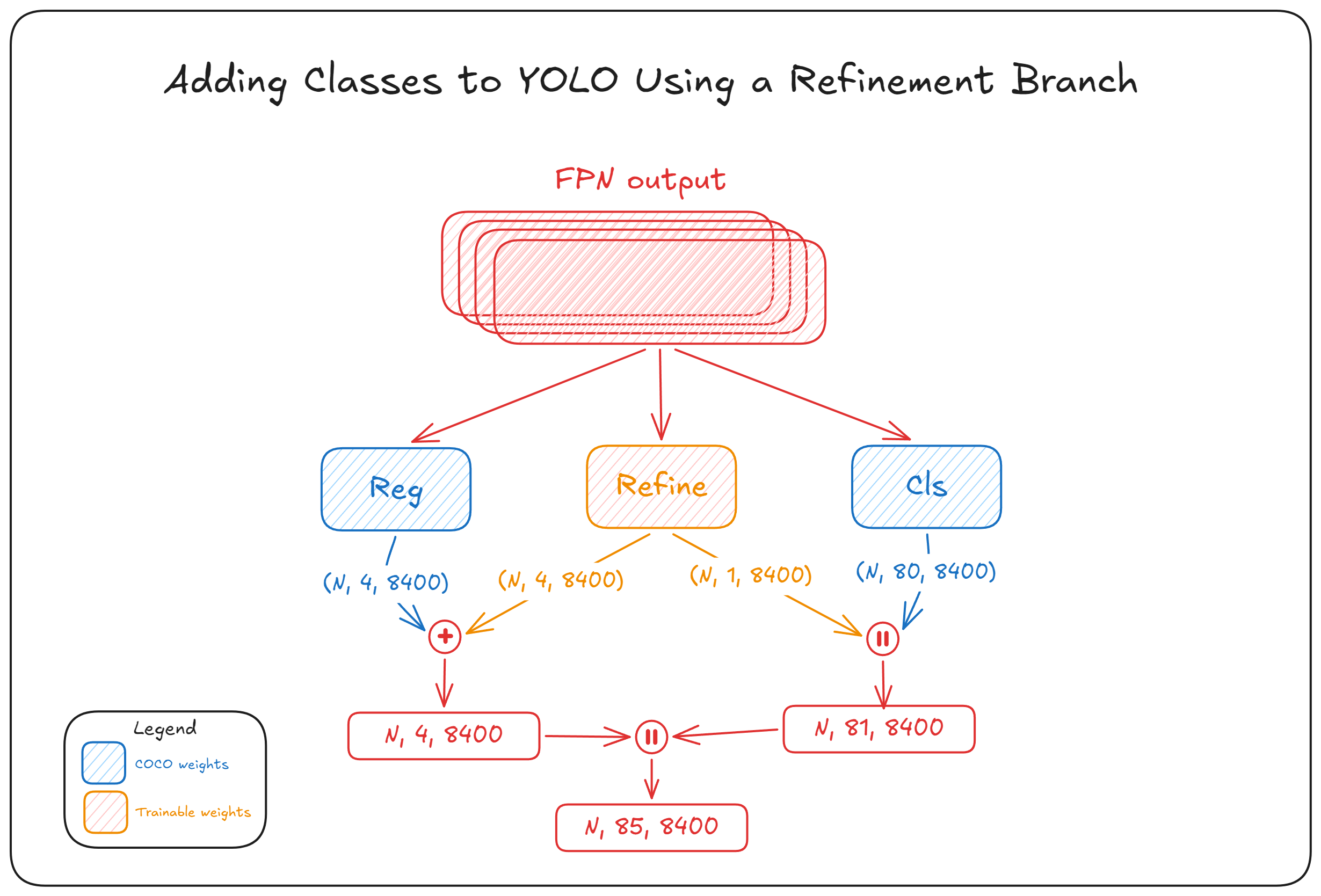
So instead of the original class scores of shape [1, 80, 8400], you get [1, 81, 8400], and the 81st row is all zeros. Those zeros are replaced by the output of the refinement branch, which is added in forward_head():
for branch, index in zip(refine, self.refine_classes):
    nr = len(index)
    r = torch.cat([branch[i](feats[i]).view(bs, nr + 4 * self.reg_max, -1) for i in range(self.nl)], dim=-1)
    scores = scores.index_add(1, index, r[:, :nr])
    gate = scores.index_select(1, index).sigmoid().amax(1, keepdim=True).detach()
    boxes = boxes + gate * r[:, nr:]
The regression and classification outputs of the refinement branch are concatenated here for convenience, but they are sliced and added separately.
For the class scores, index_add adds the learnt deltas to the rows of the tuned classes and leaves every other row untouched. Remember that this approach can tune existing classes too, so it is not always adding to a newly added row. It can also add to an existing row, raising or lowering the score of the person class at a particular anchor.
Unlike the class scores, the boxes are not class specific. There is only one box per anchor and it is shared by all classes, so a box delta cannot be applied to one class alone. The box delta addition therefore needs a gate. The gate scales the delta by the confidence of the tuned classes at that anchor, which is near zero where the new class is not present, so the boxes of the old classes stay where they were. The gate also needs to be detached so that the box loss does not get access to the classification branch through this gate. Otherwise, it can just raise the class scores as a shortcut to produce a larger box correction. This is also why the class scores of the untuned classes are identical, but their boxes can shift slightly.
The anchors are where this approach differs most from the old one. The second head in the earlier guide predicted its own set of anchors, so merging the two heads stacked them along the anchor dimension and doubled their number, from 8400 to 16800 for a 640 input. Half of those anchors carried zeros in the class rows of the COCO classes and the other half carried zeros in the rows of the new ones, and NMS then had to run through twice as many candidates on every image. The refinement branch approach does not touch the anchor dimension at all. It only adds a row to the class dimension, so an 81-class refined model produces the same output shape as a normally trained 81-class detection model, and NMS, postprocessing and export see nothing unusual.
The rest of the model is frozen. The backbone, the neck and the box branches are frozen outright. The classification branch keeps its last layer trainable, so the tuned classes can also learn a readout from the features that branch already computes, which costs nothing extra at inference because the row exists either way. The gradients of the other rows are zeroed with a hook:
def mask_rows(grad):
    """Zero the gradient rows of classes not tuned in this session."""
    return grad.index_fill(0, rows, 0.0)
However, zeroing the gradients is not sufficient on its own. Weight decay pulls every weight towards zero whether or not it received a gradient, and momentum keeps applying older gradients after the fact, so the untuned rows are saved and written back after every step:
def optimizer_step(self):
    """Step the optimizer, then undo its weight decay and momentum on the untuned classification rows."""
    super().optimizer_step()  # also updates the EMA, restored below along with the model
    with torch.no_grad():
        for p, rows, weights in self.untuned_rows:
            p[rows] = weights
The EMA is also restored along with the model. This is because the optimizer does move all the unfrozen rows for the duration of a step, including the rows of the classes that are not being trained. It’s only after the step that we restore the old weights. But the movement has already occurred during that window, and the EMA has already recorded it. So an EMA that was not restored would average those movements into the saved checkpoint. Batch normalization statistics are not an issue here, unlike in the earlier guide, because frozen layers in Ultralytics no longer update them.
Results
The run in the Colab notebook adds license-plate as class 80 to a COCO pre-trained yolo11n using the licence plates dataset from Ultralytics Platform, 2025 training images and 200 validation images with 261 plates between them. It ran for 50 epochs on a T4, which took about 51 minutes:
model = YOLO("yolo11n.pt")
model.train(data=yaml_path, epochs=50, optimizer="MuSGD", batch=4, lr0=0.001, warmup_bias_lr=0.001, classes=[80], trainer=RefineDetectionTrainer)
The learning rate is lower than the default because only a small branch is being trained. The final validation on the best checkpoint gives:
                 Class     Images  Instances      Box(P          R      mAP50  mAP50-95)
                   all        200        261      0.895      0.782      0.869      0.532
         license-plate        200        261      0.895      0.782      0.869      0.532
Only license-plate appears in the metrics, because classes restricts the validation to the classes being tuned. Running the pre-trained model and the refined one on the same image shows the rest:
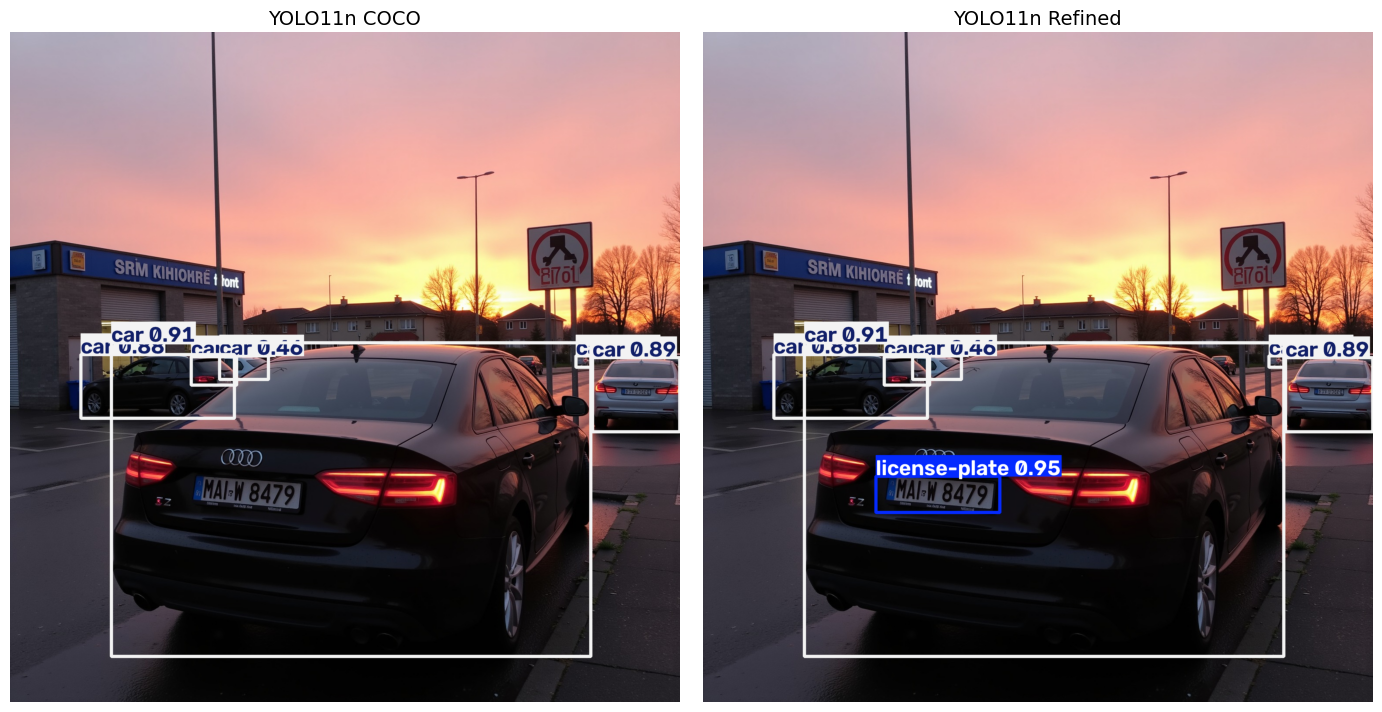
The cars are detected identically by both models, down to the confidences, and the plate is detected at 0.95 by the refined one. The refinement adds 2% more parameters to the model:
| Model | Parameters | GFLOPs |
|---|---|---|
| YOLO11n | 2,616,248 | 6.5 |
| YOLO11n + 1 class | 2,669,886 | 6.7 |
The branch width does not depend on the number of classes it refines, only the output convolution does, so tuning five classes in one session costs about the same as tuning one. At the end of the training, what you get is a normal checkpoint. Prediction, validation and export work as usual without the patched branch installed, so you can install the official Ultralytics again and load this .pt file without an issue. This is unlike the old approach, where the modified repo had to stay installed for the loading to work.
Adding classes in more than one session
If you want to add another class later, you train the tuned checkpoint again. That stacks a second branch and freezes the first, so the class from the first session keeps its predictions in the same way the COCO classes do:
# session 1 added class 80, session 2 adds class 81 and keeps class 80
model = YOLO("runs/detect/train/weights/best.pt")
model.train(data="data-2.yaml", epochs=50, classes=[81], trainer=RefineDetectionTrainer)
Every session leaves a branch in the model permanently, so the 2% from the run above is paid again for each one, while one session tuning three classes costs the same as one session tuning one. To reduce overhead, pass the classes together as classes=[80, 81] when you already have them, and stack sessions only for classes you obtain later.
The YOLOE trick
Everything so far assumes you have a trained detection model to start from, and one whose features are relevant to your images, since the refinement branch can only work with the features the base model already produces.
If you do not have a pre-trained model that covers the classes you need, you can build the base model with YOLOE. It detects classes from text prompts. Its detections are not as good as those of a model trained on those classes, because they are zero shot, and that is exactly what the refinement approach in this guide is for. You can fine-tune the classes that perform poorly on your own dataset.
In my opinion, YOLOE is quite underrated given how ingenious the idea behind it is. Not only can it perform zero-shot detection, but it can also reparameterize itself to turn into a fixed-class YOLO model without training anything. It does so by fusing the prompt embeddings into the classification head. It then runs at the same speed as a normal YOLO model of the same size.
To produce the base model from YOLOE, you can use the following code. The released YOLOE checkpoints are segmentation models, so the weights are loaded into a detection model first:
from ultralytics import YOLOE
from ultralytics.utils.patches import torch_load

# every class the model should detect, in the same order as the dataset YAML
names = ["person", "car", "truck", "license-plate"]

model = YOLOE("yoloe-26n.yaml")  # a Detect model, the released checkpoints are Segment
model.load(torch_load("yoloe-26n-seg.pt")["model"])
model.model.eval()
model.model.get_vocab(names)  # embeds the names and fuses them into the cls head
model.save("yoloe-det-fused.pt")
The saved checkpoint is a normal YOLO model like any other, so it can be refined the same way, with the classes index pointing at the position of the class in the names list above:
from ultralytics import YOLO
from ultralytics.models.yolo.detect import RefineDetectionTrainer

model = YOLO("yoloe-det-fused.pt")
model.train(data="data.yaml", epochs=50, classes=[3], trainer=RefineDetectionTrainer)
Keep names in the same order as the dataset YAML so that classes refers to the same class in both.
Caveats
The main caveat is the same as in the earlier guide, because it is the same trade. The backbone learns nothing new, so the new class is recognized from features the pre-trained model already has. That works when the class resembles something the model has seen, such as a rhino against a model that knows elephants and cows, and it works poorly for a domain the backbone has never encountered, such as X-ray, satellite or microscopy images. The license plate run above works for the same reason, since a COCO model has seen plenty of street scenes and cars even though it has no class for the plates on them. Starting from YOLOE helps here, because it is a zero-shot model and its backbone is more general than a COCO pre-trained one.
Also, tuning a class the model already knows is not protected from overfitting. Tuning person, which was learned from tens of thousands of COCO images, on ten images from your site will very likely overfit the model to those ten images and can make it worse everywhere else. So this approach cannot prevent the model from forgetting what it learnt about the existing classes that are being tuned. It only prevents forgetting for classes that are not being trained.
Conclusion
The earlier guide reached this result by adding a second head onto the model and merging the outputs manually. The trainer does the same job with a branch inside the existing head, a frozen model around it and a few rows of the classification layer held in place, and it comes down to one extra argument in model.train().
Thanks for reading.